The AI Knowledge Base
For busy professionals, not programmers

Most people use AI as a chatbot. It can do far more.

A step-by-step guide to getting real work out of ChatGPT, Claude and Gemini.

Go from typing questions into a chat box to handing AI whole tasks, and even building your own tools for everyday work. Plain English, no coding needed to start.

More than 100 guides and recipes · Updated as the tools change

How the ladder works

Five levels, each building on the one before. Find your level, work through its guides, then take a short self-check to move up, so you always know what to learn next.

One task: keeping up with your industryHow it changes as you climb
  1. Level 1Chatbot

    You ask what's new in your field and get a vague, possibly outdated summary.Most people are here

  2. Level 2Power user

    You have it search the web and cite sources, and get a current rundown you can trust.

  3. Level 3Context

    It knows your clients, competitors and market, so it picks out what matters to you.

  4. Level 4Agents

    It researches on its own for an hour and hands you a briefing, with a source for every claim.

  5. Level 5Systems

    Every Monday, a briefing on your clients, competitors and rule changes is in your inbox before you are.

Rolling AI out to a team

Get your whole team on the same page with AI.

AI pays off when the whole team uses it well, not just the two or three people who worked it out on their own. Give everyone the same path to get there, and a simple way for you to roll it out.

One shared path

Everyone starts at their level

A one-minute check places each person, and the five levels give your team a common way to talk about AI skill.

Same playbooks

Common work, done the same way

Shared recipes and one set of safety rules, so good habits spread instead of staying with one or two people.

Easy to run

Set up in minutes

Buy seats, send invite links and manage your team yourself. Teams from $169 a seat a year.

The problem

Most people never get past the chat box.

You've tried ChatGPT. It's handy. But you have a feeling there's much more, and you're right. Most people get stuck at the same point: ask a question, get an answer, copy and paste, repeat.

That isn't a talent problem. Nobody showed you the next steps. The AI Knowledge Base does.

How most people ask "What do these sales numbers mean?" "Your sales show some ups and downs over the year."
What you'll learn to do
  1. 1

    Give it the data

    12 months of sales
  2. 2

    Tell it what you need

    "I run a 10-person agency. Find the three trends that matter most, flag any risks, and show me a chart."

    Takes about 30 seconds to write.

  3. 3

    Get a real insight

    Revenue is up 12%, but 41% now comes from one client. If they leave, you're below last year.

    JanDec
    Top clientEveryone else
4

Have it build you a dashboard

Describe what you want to track, and AI builds you a working dashboard that updates itself and warns you when something needs attention. You don't write the code; AI does. It's yours to keep.

Northpoint
JMJordanNorthpoint Studio
LiveSynced 2 min ago · Monday, December 1

Good morning, Jordan

30DQTDYTDJan 1 – Dec 1, 2026↓ Export
Revenue this year↗ 12.0%
$1.02M92% of annual goal
Invoices paid↗ 8.4%
214Avg. 18 days to pay
Top client share↗ 23 pts
41%Harbor Group · limit 30%
Cash position2 overdue
$78,400Collected this month
Collected$78.4K
Overdue$11.2K
Revenue mix···
$1,018,400↗ 12.4%
vs $906,100 last year
Harbor Group41%$417,544
Lane & Co14%$142,576
Brightwell9%$91,656
22 other clients36%$366,624
Revenue by monthStackedTrend
Harbor GroupEveryone else
30K60K90KJFMAMJJASOND
Dec $89.6K Harbor 41%
Northpoint AI 3 new↗
  • Harbor Group is 41% of revenueUp from 18% in January. Diversify before renewal.
    ›
  • 3 lookalike prospects foundEst. $96,000 in new annual revenue
    ›
  • Clients pay faster on TuesdaysInvoices sent Tue are paid 6 days sooner
    ›
  • 2 invoices are overdueReminders drafted for Brightwell and Lane & Co
    ›
✦ Ask Northpoint anything↑
Recent invoicesAllPaidOverdue
ClientDateStatusAmount
HGHarbor GroupINV-2041Today, 9:12 AM$16,900.00
BWBrightwellINV-2038Oct 28Overdue$4,800.00
LCLane & CoINV-2036Oct 24Overdue$6,400.00
NFNorthfieldINV-2044Today, 8:40 AMSent$3,150.00
Client healthTodayHistory
78Healthy↗ 4 pts
050100
  • 28NovRepeat projects rose to 64%+3
  • 21NovBrightwell flagged as slow payer−2
↻ Smart remindersRecommended by AI
$11,200recoverable from overdue invoices

2 invoices are past due. Friendly reminders sent Tuesday at 9 AM get paid about 6 days sooner.

DetectedDraftedSend
↻ Send remindersReview

Example: a dashboard built by following the Level 5 guides.

Inside the knowledge base

Built to use while you work.

Not a course you have to finish. Look up what you need in seconds, or follow the path from wherever you're starting.
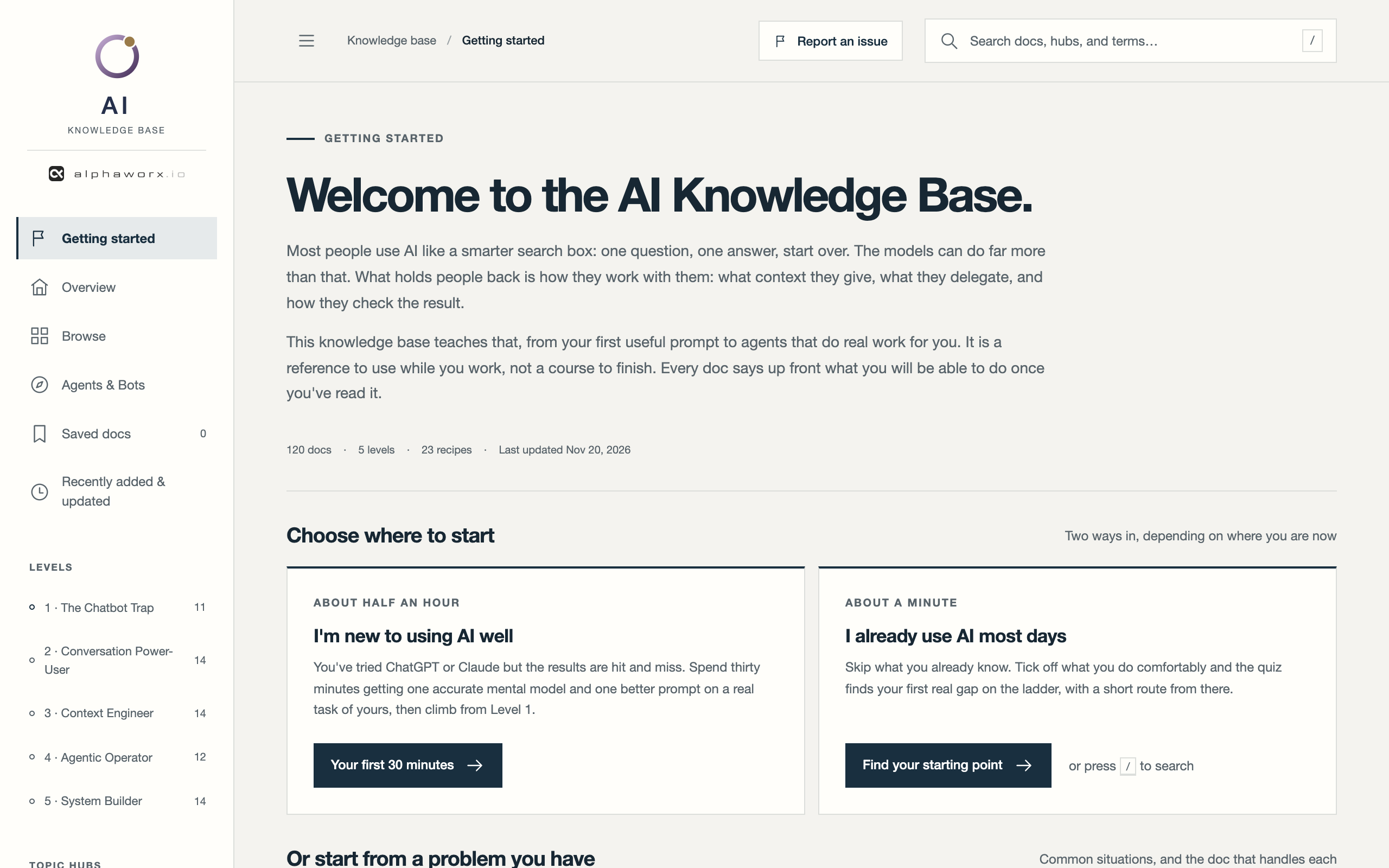
theaikb.comWelcome
The AI Knowledge Base welcome page with two ways to start and the five levels in the sidebar
  1. 1
    Two ways to startNew to AI? Start with a 30-minute primer. Already using it? A one-minute check finds your level.
  2. 2
    Five levels, always in viewThe sidebar shows where you are and what comes next, so you never wonder what to read.
  3. 3
    Search everythingFind the guide or recipe you need in seconds, right in the middle of real work.
Always current

AI changes every week. So does the AI Knowledge Base.

Our AI specialists and editors track every major release, add new guides and revise outdated ones, so what you learn reflects the tools as they work today.

How updates workOngoing
New modelUpdatedAffected guides are revised within days of a major release, with what changed and what it costs.
New featureAddedWhen a tool gains something useful, a new recipe shows you how to use it at work.
Outdated adviceCorrectedAnything that stops working is fixed and marked as updated, so you know what's current.
What's inside

More than 100 guides, recipes and references.

Everything is organized so you always know what to read next, and can find what you need in the middle of real work.

5 levels

The learning path

From first principles to running your own AI systems. Every level ends with a short self-check.

Playbooks

Playbooks for real work

Step-by-step guides for jobs like meeting prep, analyzing numbers and working through a stack of documents.

Tool guides

Which tool, when

ChatGPT, Claude, Gemini and more, with a plain comparison of when to use each.

Prompt pack

Ready-to-use prompts

Starter prompts for the tasks that come up every week, ready to adapt to your work.

Safety

Trust, but check

What happens to what you type, how to catch made-up answers, and how to keep agents in check.

Teams

Rolling AI out to a team

A guide for leaders who need the whole team using AI well, not just themselves.

Who it's for

Who gets the most out of it.

01 / OWNERS

Business owners and partners

You know AI matters and you want your firm ahead of it, not catching up.

02 / MANAGERS

Team leaders

You need your team using AI well, and safely, without becoming the IT department.

03 / EVERYONE

Curious, but not sure where to start

You've tried ChatGPT a few times and know there's more. This shows you what, step by step.

Pricing

$199 a year. Teams from $169 a seat.

Billed yearly. Cancel anytime and keep access until your year ends.

Get started

Stop chatting with AI. Start working with it.

Start at your level, from your first prompt to building your own tools.